Unlocking Retro Charm: A Practical Guide to Using Santa Groovy
Finding the right typeface can feel like searching for a needle in a haystack, especially when you are aiming for a specific aesthetic that balances nostalgia with modern readability. Santa Groovy has emerged as a standout option for designers and creators who need that authentic, vintage handwritten touch without sacrificing usability. This cool, vintage-style font brings a distinct personality to projects, evoking the laid-back vibe of the 1970s while remaining sharp enough for contemporary branding. However, simply downloading a stylish font is not enough to guarantee a successful design. Many users, from seasoned professionals to enthusiastic hobbyists, often overlook critical details regarding licensing, technical encoding, and contextual application, leading to frustrating results.
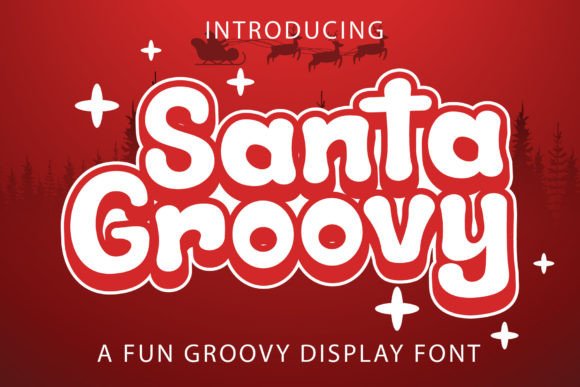
At its core, Santa Groovy is designed to add a special retro flair to any creative idea. Whether you are crafting logos, developing brand identities, designing wedding invitations, or creating eye-catching social media posts, this typeface offers a unique voice. Yet, a common misunderstanding arises when users assume that all "handwritten" fonts behave the same way. One of the most frequent mistakes involves ignoring the technical capabilities of the font file itself. Santa Groovy is PUA encoded, a feature that many beginners fail to utilize fully. PUA (Private Use Area) encoding allows access to a vast array of glyphs, swashes, and alternate characters that are not immediately visible on a standard keyboard layout.
When designers neglect to explore these PUA-encoded features, their final output often looks repetitive and mechanical, defeating the purpose of choosing a handwritten style. A logo or invitation that uses the same standard "a" or "g" throughout lacks the organic flow of actual handwriting. To avoid this flat appearance, you must learn how to access the full character map within your design software. By actively swapping in alternate glyphs and swashes, you create a dynamic composition that feels truly custom. This small adjustment significantly elevates the quality of your work, transforming a generic text block into a piece of art that captures attention.
Navigating Licensing and Usage Rights
Another area where creators often stumble is the interpretation of licensing terms. In the rush to start a project, it is tempting to download a font and immediately apply it to a client's logo or a product intended for sale. This approach can lead to serious legal and financial complications down the road. Before integrating Santa Groovy into any commercial venture, such as branding for a small business or merchandise for an online store, you must verify the specific license attached to your download. Font licenses vary widely; some are free for personal use only, while others require a commercial upgrade.
Using a personal-use font for a commercial logo not only violates the creator's rights but also puts your client's brand at risk of cease-and-desist orders. A better approach is to treat font acquisition with the same diligence as purchasing stock photography or software. Read the included readme file or visit the foundry's website to understand exactly what is permitted. If you are a freelancer working with multiple clients, investing in a robust commercial license is often more cost-effective than dealing with legal disputes later. This proactive step ensures peace of mind and maintains your professional reputation.
Contextual Application and Readability
While the groovy aesthetic of Santa Groovy is undeniably charming, it is not a universal solution for every text element in a design. A significant error many marketers and bloggers make is using highly stylized display fonts for body copy or long-form content. The intricate loops and varying stroke weights that make this font perfect for headlines can become exhausting to read in paragraph form. When viewers struggle to decipher your message, communication breaks down, and engagement drops.
To maintain efficiency and clarity, reserve Santa Groovy for elements that need to pop: headers, pull quotes, call-to-action buttons, and short labels. Pair it with a clean, neutral sans-serif or a simple serif font for the main body text. This contrast creates a balanced hierarchy that guides the reader's eye naturally. For instance, in a wedding invitation suite, use Santa Groovy for the couple's names and section titles, but switch to a legible serif for the venue details and RSVP information. This strategy preserves the retro mood while ensuring guests can easily find the information they need.
Furthermore, consider the medium where your design will live. What looks fantastic on a high-resolution desktop monitor might lose definition on a mobile screen or when printed on textured paper. Always test your typography in the final environment. If you are designing social media graphics, zoom out to see how the text appears on a small smartphone display. If the swashes and curls of Santa Groovy become muddy or indistinguishable at smaller sizes, simplify your choice of glyphs or increase the font size. Adaptability is key to professional results.
Technical Integration and Workflow
For those new to design software, the installation and activation of fonts with special encoding can seem daunting. Some users install the font but never figure out how to access the extra characters, assuming the font is limited to the basic alphabet. This limitation is rarely in the font itself but rather in the user's workflow. Most modern design applications, such as Adobe Illustrator, Photoshop, or even free alternatives like Inkscape, have glyph panels specifically designed to browse and insert these special characters.
Taking the time to learn these tools pays off immensely. Instead of settling for the default letterforms, spend a few minutes experimenting with the alternate sets. You might find a swash that perfectly connects two letters in a logo, creating a seamless ligature that looks bespoke. Additionally, keep your font library organized. As you collect more typefaces, it becomes easy to lose track of which ones are PUA encoded and which are not. Tagging or categorizing your fonts based on their features can save hours of frustration during tight deadlines.
Ultimately, the goal is to let the tool serve your vision, not hinder it. Santa Groovy offers a incredible opportunity to inject personality and warmth into your projects, bridging the gap between vintage cool and modern design standards. By respecting licensing agreements, leveraging the full range of PUA-encoded glyphs, and applying the font with strategic intent, you avoid common pitfalls that plague less experienced designers. Whether you are an educator creating engaging classroom materials, an entrepreneur launching a new product line, or a blogger refreshing your site's header, mastering these nuances ensures your work stands out for the right reasons. Embrace the retro vibe, but back it up with smart, informed design decisions.